Webcast and Recording Service User Documentation

Welcome to the CERN's webcast service user documentation.
The CERN Webcast Service makes CERN lectures, meetings, and seminars accessible to universities, schools, and the general public.
You can watch live events on live.cern.ch from your computer, tablet, or mobile phone. The service is integrated with many CERN auditoriums and meeting rooms, allowing anyone, anywhere, to follow CERN’s latest research and discoveries in real time.
It also provides the streaming infrastructure for recorded videos available on CDS Videos (CERN's multimedia archive) and integrates with Indico to offer a seamless experience for both live and recorded events.
What can we provide?
- If you are an event organizer: We stream live events, record and archive them in CDS Videos. You can find more information on the Organising a live webcast of an event in an equipped room page.
- If you require 24/7 streaming: Our infrastructure is capable of handling streams using
RTMPandRTSPprotocols. - If you want to attend live events: We showcase live events on the CERN Live website (https://live.cern.ch).
Contact us
Please, open a ticket to submit a request using the following forms:
- Submit a request
- Report an incident with the service
- Report an issue during the streaming of an event
Working hours
- Normal working hours: 8:30 - 17:30
- Out-of-hours support: Please open a ticket
All the cases during Out-of-hours (including real time troubleshooting) will be taken in a best effort basis (no guaranteed service).
Overview of the service
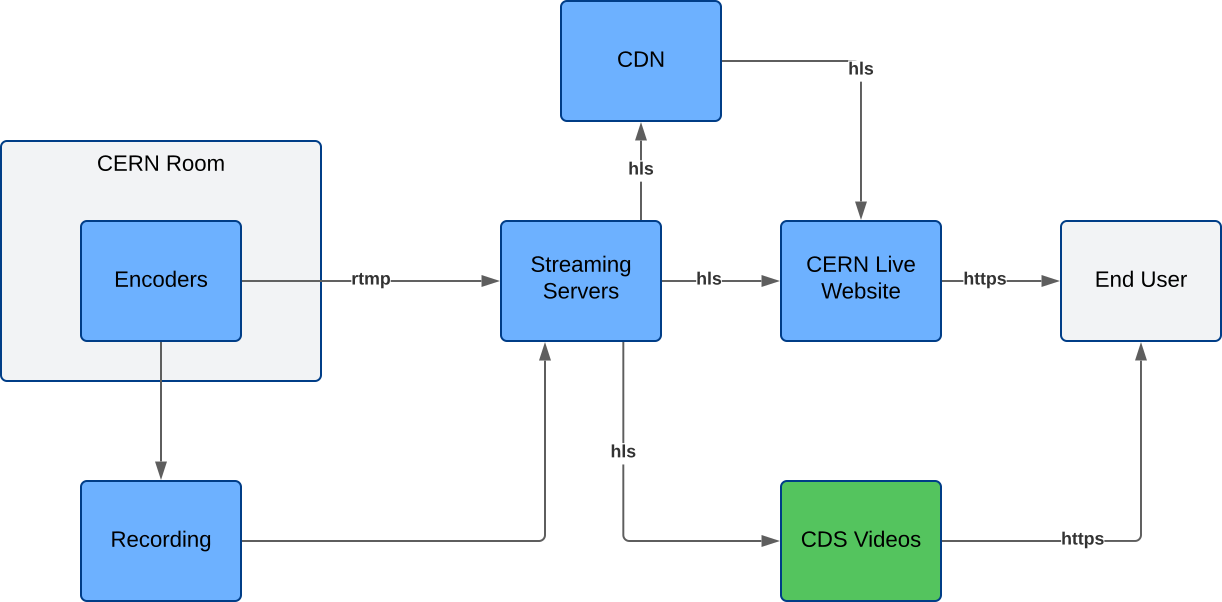
🟦 Interrnal to our service 🟩 External to our service
Explaination of this overview diagram
1. CERN Room
- Physical room where the event takes place.
- Equipped with cameras and microphones.
- Sends the AV signal to the encoders.
2. 🟦 Encoders
- Located inside the CERN Room.
- Convert audio/video into a digital streaming format.
- Send the live feed via RTMP to the Streaming Servers.
- Simultaneously record a local copy of the event.
3. 🟦 Recording
- Stores the raw recordings produced by the encoders.
- Used later for post-processing and archival.
4. 🟦 Streaming Servers
- Receive live streams from encoders (RTMP).
- Convert and distribute streams as HLS.
- Send HLS streams to CERN Live Website (live) and CDS Videos (VoD).
5. 🟦 CDN (Content Delivery Network)
- Distributes live streams efficiently to multiple regions.
- Balances load and improves delivery speed.
6. 🟦 CERN Live Website
- Hosts live broadcasts for real-time viewing.
- Retrieves HLS streams from Streaming Servers or CDN.
- Serves content to users over HTTPS.
7. 🟩 CDS Videos
- Stores and publishes processed recordings.
- Provides on-demand access to past events.
- Uses HLS and delivers via HTTPS.
8. End Users
- CERN staff or public viewers.
- Watch live streams on CERN Live Website.
- Watch recordings on CDS Videos.
- Access all content securely over HTTPS.
Presentations about the service
- 2024 - Streaming Science Globally: CERN’s Live Streaming Service
- 2021 - The new weblecture and postprocessing service
- 2021 - Running an AV media post-processing system on FOSS
- 2020 - Insights on VIP webcast events: last COVID DG’s talk use case
- 2017 - Tutorial on Webcast and Recording in Indico
- 2017 - New webcast website development and deployment
- 2016 - Flash is dead, finally
- 2015 - Do you want to get 40 Tbps?
- 2012 - Webcast: An architecture to scale up to global demands
- 2009 - Lecture archiving on a larger scale at the University of Michigan and CERN
- 2007 - A new webcast infrastructure
- 2006 - New retransmission system
- 2003 - Webcast Live Events handling
- 2001 - The new Webcast production cycle
- 2001 - Smiling with SMIL
- 2001 - Improving Webcast Web site